LED Ir
available at 4 shops · updated 27/04/2026 ago
Description
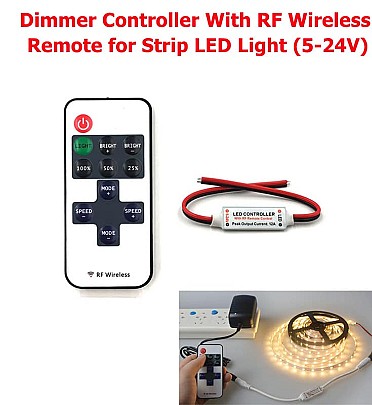
12V RF Wireless Remote Control In-line Led Strip Dimmer 10-Level Bright Speed Led Switch Module Voltage Regulator Dimmers Instructions for RF Wireless Remote 1.Turn On/ Standby Press this key to turn on unit or switch to standby mode. Unit will turn on and restore to previous status at powering on moment. 2. Lighting mode Switch to lighting mode from dynamic mode. 3/8/9. Dimmer Adjust Shortcuts Switch to 100%, 50%, or 25% brightness lighting mode. 4/6. Dynamic Mode Adjust Switch to dynamic mode from lighting mode, or switch between different dynamic modes. 5/7. Speed Adjust Adjust playing speed of dynamic modes. Press SPEED+ to increase seed and press SPEED- to decrease. 10/11. Brightness Adjust (Dimmer) Adjust lighting mode brightness. Press BRIGHT+ to increase brightness and press BRIGHT- to decreaseFunctions for RF Wireless Remote Dimmer & Dynamic 8 Dynamic Effects 10-level Dimmer 256-Grade PWM Speed Adjustable Card Type Remote Ultra Slim Design Smooth Dimmer Effect 1 to 1 Remote Paired Auto Save Function Installing for RF Wireless Remote 1. Power Supply This unit accepts DC 5V to 24V power supply. The red cable should be connected to positive and black cable to negative. Please select proper power supply according to the LED application.2. LED Output The red cable should be connected to LED positive and black cable to negative. The peak output current is 12A, please reduce load if main unit is overheating. CAUTION:Do not short circuit the LED output, this may lead to perm
Available at